A Senior Engineer's Guide to Prompting AI for Real Code
- Turker Senturk
- Technology , Software
- 07 Mar, 2026
- 13 min read
If your idea of using AI for coding still involves tabbing twice to accept a generic boilerplate function, we need to talk. We’re way past the era of mere code completion.
As of early 2026, OpenAI Codex (the technical foundation behind the coding models in Cursor, Copilot, and ChatGPT) has evolved from a sophisticated autocomplete into a semi-autonomous software engineering agent. That’s a big deal. A completion engine saves you typing; an agentic coding model saves you thinking—if you know how to steer it.
Teams at major tech companies are merging up to 70% more pull requests weekly when they lean heavily on AI coding assistants. But this doesn’t happen by accident. It requires treating the LLM not as a search engine, but as an incredibly fast, slightly amnesiac junior developer.
Here’s how to actually use OpenAI Codex and modern AI models to write, test, and debug code that survives contact with production environments.
Getting Started with Codex
To use Codex effectively today, you need to rethink what an IDE plugin or a chat window is actually doing. You aren’t just sending text to a server; you’re initializing an agent context.
The early iterations of Codex (like the now-deprecated code-davinci-002) were highly stateless. You fed them a prompt, they spit out raw tokens, and you prayed for a syntactically valid result. Today’s ecosystem, powered by multimodal GPT-5 class models, relies heavily on persistent context and RAG (Retrieval-Augmented Generation).
Before you write a single prompt, establish the ground rules for your codebase. The industry standard right now is maintaining an AGENTS.md or .cursorrules file at the root of your repository. This file acts as the constitutional law for any AI interacting with your project. Instead of reminding the AI in every prompt to “use snake_case for Python variables” or “always use our custom logging wrapper,” the model picks up this config automatically when initializing a workspace.
When you boot up a Codex-powered environment, you should be operating within a cloud sandbox or isolated container. This matters because modern agents don’t just write code; they run it, test it, and iterate on it. If you want the AI to navigate your monorepo properly, make sure your toolset indexes the codebase so the model has access to your type definitions, interfaces, and architectural patterns. For a deeper look at how these integrations work under the hood, check out IBM’s breakdown on AI agents.
Here is what the modern, agentic workflow actually looks like:
graph TD
    A[Human Developer] -->|Provide High-Level Intent| B(Codex Agent)
    B -->|Reads AGENTS.md| C{Context Engine}
    C -->|Indexes Codebase| D[Code Generation]
    D -->|Executes in Sandbox| E(Cloud Test Environment)
    E -->|Test Failures| B
    E -->|Tests Pass| F[Propose Pull Request]
    F -->|Code Review| A
Writing Your First Prompt for Code Generation
The biggest rookie mistake I keep seeing is prompting an LLM like it’s a Google search. “Write a function to connect to PostgreSQL” is a terrible prompt. It leaves the model to guess your framework, your ORM (or lack thereof), your error handling strategy, and your security requirements.
When crafting a prompt for production code, you need role assignment, precise constraints, and clear boundaries. Think of it as writing a hyper-detailed Jira ticket—you’re trying to reduce ambiguity to near zero.
Here is an example of a proper, production-ready prompt for code generation:
You are a senior backend engineer specializing in Go and PostgreSQL.
I need a Go function `GetActiveUsers(ctx context.Context, db *sql.DB)` that fetches users who have logged in within the last 24 hours.

Constraints:
1. Do not use an ORM. Use the standard `database/sql` package.
2. You MUST use prepared statements to prevent SQL injection.
3. Handle context cancellation and database timeouts gracefully.
4. If the query fails, return a wrapped error using `fmt.Errorf` with the context of the failure.
5. Return a slice of `User` structs (assume the struct is defined in the same package).

Do not provide explanations, only output the Go code.
Notice the structure? We set a persona, lock in the exact signature, impose technical constraints, mandate security practices, and dictate the output format. By constraining the model this way, you prevent it from hallucinating external dependencies or making wild architectural choices. OpenAI’s own prompt engineering guide confirms that clearly defining inputs and outputs is one of the most effective ways to cut down on errors.
Generating APIs with Codex
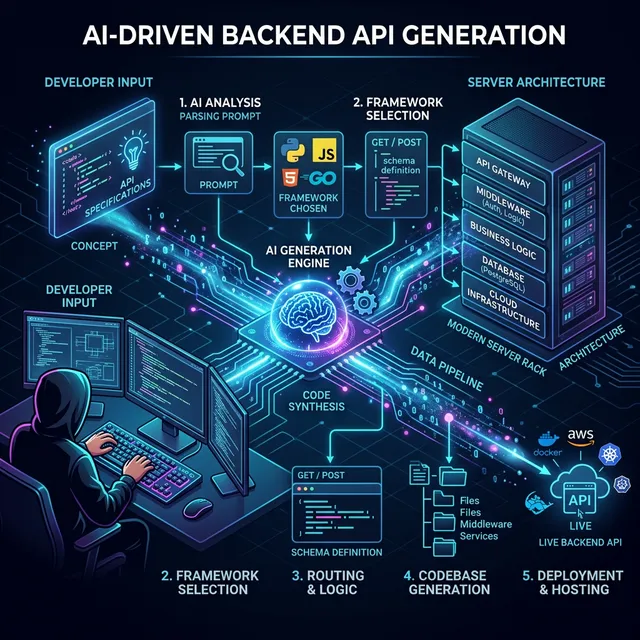
This is where modern models really shine—as long as you give them proper scaffolding. The AI needs to understand the ecosystem your endpoint will live in. If you just ask for an endpoint, you’ll get a vanilla implementation. If you provide a cross-section of your routing, validation, and database layers, you’ll get an endpoint that plugs directly into your existing architecture.
Let’s say we’re working in Python with FastAPI. You don’t just want the route; you want the Pydantic schemas, the dependency injection for the database session, and the appropriate HTTP status codes.
Here is a prompt strategy and the resulting code pattern:
Prompt: “Write a FastAPI POST endpoint /api/v1/workspaces to create a new user workspace. Use the existing get_db_session dependency. Implement a Pydantic schema WorkspaceCreate requiring a name (min 3 chars) and an optional description. If the workspace name already exists for the user, raise an HTTP 409.”
from fastapi import APIRouter, Depends, HTTPException, status
from sqlalchemy.ext.asyncio import AsyncSession
from pydantic import BaseModel, Field
from typing import Optional

# Assume dependencies are imported
from app.api.dependencies import get_db_session, get_current_user
from app.models import User
from app.crud import workspace_crud

router = APIRouter()

class WorkspaceCreate(BaseModel):
    name: str = Field(..., min_length=3, description="The name of the workspace")
    description: Optional[str] = Field(None, description="Optional description")

@router.post("/workspaces", status_code=status.HTTP_201_CREATED)
async def create_workspace(
    payload: WorkspaceCreate,
    current_user: User = Depends(get_current_user),
    db: AsyncSession = Depends(get_db_session)
):
    """
    Creates a new workspace for the authenticated user.
    """
    existing_workspace = await workspace_crud.get_by_name(db, name=payload.name, user_id=current_user.id)
    if existing_workspace:
        raise HTTPException(
            status_code=status.HTTP_409_CONFLICT,
            detail=f"Workspace with name '{payload.name}' already exists."
        )

    new_workspace = await workspace_crud.create(db, obj_in=payload, user_id=current_user.id)
    return new_workspace
The model picks up on async SQLAlchemy patterns (a natural fit with FastAPI) and wires up the dependency injections correctly. The point is: the AI handles the plumbing so you can focus on the actual business logic and architectural decisions.
Using Codex for Unit Tests
If there’s one place to burn through your AI credits without guilt, it’s unit testing. Writing comprehensive tests is tedious, time-consuming, and vital. LLMs happen to be exceptionally good at generating edge cases that a tired developer might miss at 4:30 PM on a Friday.
The trick is not to ask the AI to “write tests for this file.” The trick is to demand specific testing patterns, like table-driven tests, and instruct the model to act as a hostile QA engineer trying to break the code.
Consider this prompt: “Acting as an aggressive QA automation engineer, write a complete table-driven test suite in Go for the CalculateDiscount(price float64, tier string) function. You must include edge cases for: negative prices, zero prices, invalid string tiers, casing issues in the tier string, and floating-point precision bounds. Use the testify/assert library.”
package pricing_test

import (
	"testing"
	"github.com/stretchr/testify/assert"
	"myapp/pricing"
)

func TestCalculateDiscount(t *testing. nil) {
	tests := []struct {
		name          string
		price         float64
		tier          string
		expectedValue float64
		expectedErr   bool
	}{
		{"Valid Standard Tier", 100.0, "standard", 10.0, false},
		{"Valid Premium Tier", 100.0, "PREMIUM", 20.0, false}, // Testing uppercase
		{"Zero Price", 0.0, "standard", 0.0, false},
		{"Negative Price", -50.0, "standard", 0.0, true},
		{"Invalid Tier", 100.0, "garbage", 0.0, true},
		{"Floating Point Precision", 100.05, "premium", 20.01, false},
		{"Empty Tier", 100.0, "", 0.0, true},
	}

	for _, tt := range tests {
		t.Run(tt.name, func(t *testing.T) {
			result, err := pricing.CalculateDiscount(tt.price, tt.tier)

			if tt.expectedErr {
				assert.Error(t, err)
			} else {
				assert.NoError(t, err)
				// Using InDelta for float assertion safety
				assert.InDelta(t, tt.expectedValue, result, 0.001)
			}
		})
	}
}
Mandating table-driven tests with specific edge cases forces the AI to produce a thorough, structured test suite. As GitHub’s engineering blogs point out, using tests as guardrails is the best way to keep an LLM on track. You generate the tests first, verify them, and then have the AI write the implementation until the tests pass.
Debugging with AI
You know the feeling: staring at a stack trace that makes zero sense. If you just throw the raw error into a chat window, you’ll get generic advice back (“Have you tried restarting the service?”).
For effective debugging, give the AI the full picture. That means the stack trace, the exact library versions you’re running, the specific block of failing code, and any relevant database schemas or environment variables.
sequenceDiagram
    participant Dev as Developer
    participant Agent as Codex Agent
    participant Env as Staging/Local Env

    Dev->>Agent: Submits Stack Trace, Failing Method, and System State
    Agent->>Agent: Analyzes internal reasoning branches (Chain-of-Thought)
    Agent-->>Dev: Proposes Hypothesis 1 (Race Condition)
    Dev->>Env: Executes test based on Hypothesis 1
    Env-->>Dev: Test Fails with new Log
    Dev->>Agent: Injects new Log to update context
    Agent-->>Dev: Proposes Hypothesis 2 (Deadlock on resource X)
    Dev->>Env: Applies fix for Hypothesis 2
    Env-->>Dev: Tests Pass
Let’s look at a concrete example with Python asyncio. If you have a deadlock, don’t just say “my code is hanging.”
Prompt: “I have a Python 3.12 FastAPI app that is deadlocking. Here is the stack trace. I suspect it’s related to mixing synchronous SQLAlchemy calls within an async route. Review the attached users.py file. Identify the blocking call, explain why it’s blocking the event loop, and provide the refactored async version.”
The model will quickly spot that session.query(User).all() is blocking the main async thread, and will rewrite it to use await session.execute(select(User)). GeeksforGeeks’ guide on AI coding backs up this “chain-of-thought” approach: forcing the AI to state why something is broken before writing the fix makes the reasoning much more reliable.
Secure Coding with AI Assistants
This is the most critical section of this article. AI will confidently write devastating security vulnerabilities if you let it.
LLMs are trained on public data, which contains decades of bad practices, hardcoded credentials, and SQL injection flaws. Trusting an AI to write secure code on its own is asking for trouble. You need to structurally enforce security.
First, control what context reaches the LLM. IDE extensions that index your workspace are powerful, but make sure to aggressively .gitignore or .cursorignore files containing .env configurations, TLS certificates, or active session tokens.
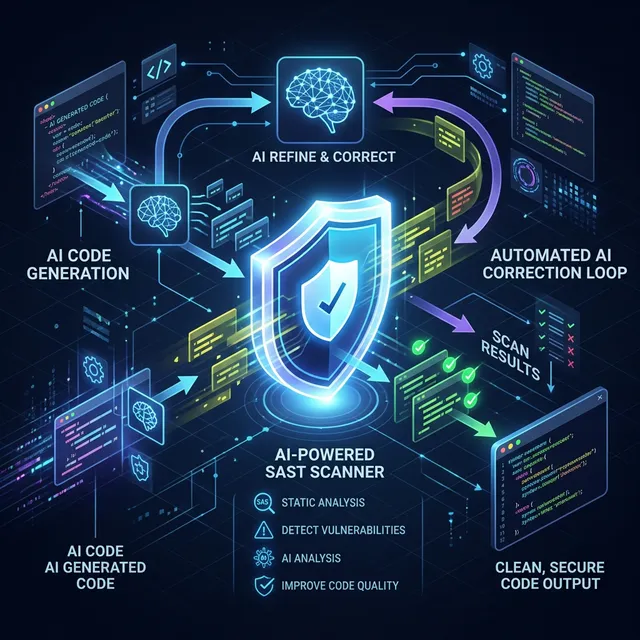
Second, plug the AI into a multi-tiered security pipeline. The workflow should look like this:
- Codex generates code.
- A static application security testing (SAST) tool like SonarQube or Snyk scans the generated code locally.
- If the SAST tool flags an Insecure Direct Object Reference (IDOR), you feed that specific SAST warning back to Codex.
Prompt: “The SAST tool flagged the following endpoint for a critical IDOR vulnerability. user_id is being passed in the payload without validating ownership. Refactor the endpoint to extract the user_id strictly from the validated JWT token in the Authorization header. Do not trust the client payload.”
Think of the AI as the typist and the SAST tool as the auditor—that’s how you get both speed and security. Be sure to review GitHub’s security policies regarding secrets and AI generation to make sure your team isn’t accidentally leaking data to external models.
Best Prompt Engineering Practices for Developers
Here’s what separates developers who get real value from AI coding tools from those who don’t.
- Kill Ambiguity Early: If you leave a decision up to the LLM, it will pick the most statistically average path—which is rarely what your specific microservice needs. Spell out the libraries, the architectural paradigms, and the naming conventions. Don’t count on the model to guess your team’s design patterns.
- Be Smart About Context Windows: In 2026, we have models with massive context windows going up to a million tokens. But dumping an entire monorepo into a prompt dilutes the model’s attention and inflates inference costs for nothing. Be selective. Give it the interface, the existing implementation, and the test file. Nothing more.
- Use Chain-of-Thought for Complex Logic: For tricky algorithms and deep business logic, use prompts that force step-by-step reasoning. “First, explain the time complexity trade-offs of using a Hash Map vs a native B-Tree for this specific data payload. Then, based on your analysis, implement the optimal solution.” This makes the AI check its own work before generating syntax.
- Use System Prompts and AGENTS.md: Don’t repeat yourself. If your team insists on returning HTTP 422 for validation errors, define that in your global agent configuration, as recommended by Andrew Ng’s DeepLearning.AI. Your global rules should contain all the implicit context.
- Iterate and Refine: Don’t expect the first generation to be perfect. Treat prompt engineering as a back-and-forth conversation. If the AI misses a null check, reply with feedback requiring it to fix the issue and explain the missing edge case. This sharpens both your prompting skills and the context window.
When NOT to Use AI Code Generation
AI is a massive productivity boost, but it’s not a magic wand. Knowing when to turn the Copilot off is just as important as knowing how to prompt it.
Don’t use AI for novel cryptographic implementations. If you’re building a custom authentication hashing mechanism (which is generally a terrible idea anyway), relying on a model that predicts the “most likely next token” is a recipe for a catastrophic algorithmic flaw. Cryptography requires mathematical certainty, not statistical probability.
AI also struggles badly with highly bespoke, deeply coupled legacy code. If you’re trying to untangle a 15-year-old C++ monolith where the business logic relies on undocumented side effects in an ancient graphics driver, the LLM won’t help. It completely lacks the institutional context—the “why”—behind those bizarre architectural decisions, and a bigger context window can’t magically recover lost tribal knowledge.
It’s also risky to use AI for high-stakes concurrency models or lock-free data structures where formal proofs of correctness are required. An AI can mimic concurrent patterns well enough, but it can’t truly reason about race conditions in edge cases that haven’t been widely documented on Stack Overflow or GitHub.
At the end of the day, OpenAI Codex and the tools built on top of it are incredibly fast code generators that know the syntax of every language on earth. But you’re still the senior engineer in the room. You own the architecture. You own the security posture. And you own the production rollout. Treat the AI as a tool you manage, not a replacement for your judgment, and your output will skyrocket without sacrificing reliability.
Share :
Stay Ahead in Tech
Join thousands of developers and tech enthusiasts. Get our top stories delivered safely to your inbox every week.
No spam. Unsubscribe at any time.