5 Essential Tips for Choosing the Right VPS Hosting in 2026
- Turker Senturk
- Technology
- 07 Mar, 2026
- 8 min read
So you’ve outgrown shared hosting. Maybe your site’s getting more traffic, or you’re tired of sharing resources with a hundred other websites on the same box. Whatever the reason, you’re looking at VPS hosting — and honestly, that’s a smart move. A Virtual Private Server gives you your own slice of a physical server with dedicated resources, root access, and way more flexibility than shared hosting ever could.
But here’s the thing: not all VPS providers are created equal. The market is flooded with options, and it’s easy to get lured in by flashy pricing or marketing buzzwords that don’t mean much in practice. Before you commit, there are a few key things you really need to pay attention to. Let’s walk through them.
1. Understand What You’re Actually Paying For (Resources Matter)
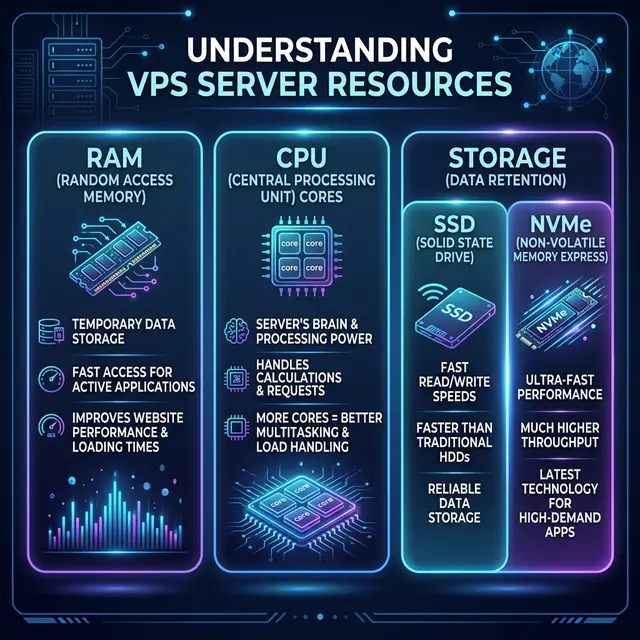
This might sound obvious, but you’d be surprised how many people sign up for a VPS plan without fully understanding what resources they’re getting. When you see a plan advertised at $5 or $10 a month, dig deeper. How much RAM is included? How many CPU cores do you get? What’s the storage type — is it SSD or NVMe, or are they still using old spinning HDDs?
Here’s a quick reality check: if you’re running a WordPress site with moderate traffic, you’ll want at least 2 GB of RAM and 1-2 vCPU cores to keep things smooth. For anything more demanding — like a Node.js app, a game server, or a database-heavy project — you’ll want to scale up from there.
Also, pay close attention to bandwidth and data transfer limits. Some providers advertise “unlimited bandwidth,” but that usually comes with a fair usage policy that’s buried in the fine print. Others give you a set amount of transfer per month (say, 1 TB or 2 TB), and charge you extra if you go over. Make sure you know what you’re getting before you get a surprise on your invoice.
The bottom line: don’t just look at the price tag. Look at the actual specs and figure out whether they match what your project needs.
2. Server Location Is More Important Than You Think
Here’s something a lot of people overlook: where your server physically sits has a direct impact on how fast your site loads for your visitors. If most of your audience is in Europe but your server is in a data center in Los Angeles, every request has to travel thousands of miles and back. That latency adds up — and it hurts both user experience and SEO.
Most reputable VPS providers offer multiple data center locations. Some give you a choice between North America, Europe, and Asia-Pacific regions. A few of the bigger players even have data centers in South America, the Middle East, or Africa.
The rule of thumb is simple: pick a server location that’s geographically closest to your target audience. If your audience is spread across multiple regions, consider using a CDN (Content Delivery Network) alongside your VPS to cache and serve content from edge servers around the world. That way, you get the best of both worlds — a powerful central server plus fast delivery everywhere.
Don’t just default to the cheapest region either. Sometimes a data center in a slightly more expensive location can save you headaches down the road in terms of performance.
3. Look at the Uptime Guarantee — But Also Look at the Track Record
Almost every VPS provider will slap a 99.9% uptime guarantee on their marketing page. Sounds great, right? But here’s the math that people rarely do: 99.9% uptime still allows for about 8.7 hours of downtime per year. That’s not nothing — especially if your site goes down during a traffic spike or a product launch.
What matters more than the advertised number is the provider’s actual track record. Before committing, do some homework. Check independent monitoring sites and look for user reviews that mention reliability. A provider that consistently delivers 99.99% uptime in practice is far more valuable than one that promises 99.9% and barely meets it.
Also, look at what happens when things go wrong. Does the provider offer compensation for downtime? Do they have a transparent status page where you can see real-time incident reports? How quickly do they respond to outages? These are the things that separate a reliable host from one that just talks a good game.
One more thing: managed vs. unmanaged hosting makes a difference here too. With unmanaged VPS, you’re responsible for keeping everything running — security patches, updates, server configuration. If something breaks at 3 AM, that’s on you. Managed VPS costs more, but the provider handles the maintenance, monitoring, and often jumps in when something goes sideways. If uptime is critical to your business, managed hosting can be worth every extra dollar.
4. Scalability: Can You Grow Without the Growing Pains?
Your needs today won’t be the same as your needs six months from now — at least, that’s the hope, right? When choosing a VPS provider, think about what happens when you need more resources.
Some providers make scaling incredibly easy. You can bump up your RAM, add CPU cores, or expand your storage with a few clicks in a dashboard — sometimes without even restarting your server. Others require you to migrate to a completely different plan, which might mean downtime and a headache you didn’t plan for.
Here’s what to look for when evaluating scalability:
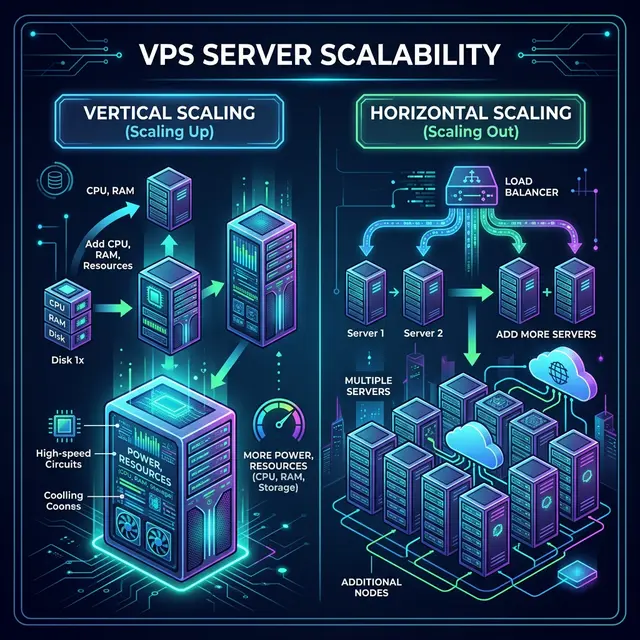
Vertical scaling means upgrading the specs on your existing server — more RAM, more CPU, more storage. This is the simplest path and works well up to a point.
Horizontal scaling means adding more servers and distributing your workload across them. This is more complex but essential if you’re building something that needs to handle serious traffic or provide high availability.
Cloud-based VPS providers (like DigitalOcean, Vultr, Linode, or Hetzner Cloud) tend to be much better at this than traditional hosting companies. They let you spin up new instances in seconds, snapshot your server for easy cloning, and often offer load balancers and private networking as built-in features.
The key question to ask yourself: “If my traffic doubles next month, can I handle it without migrating to a new provider?” If the answer is no, you might want to keep looking.
5. Customer Support Can Make or Break Your Experience
Let’s be honest — at some point, something will go wrong. Your server will have an issue, a configuration will break, or you’ll need help with something you’ve never dealt with before. When that moment comes, the quality of your provider’s customer support becomes the most important thing in the world.
Here’s what separates good support from bad support. Response time is the first thing. When you submit a ticket at 2 AM because your site is down, are you getting a reply in 15 minutes or 15 hours? Some providers offer guaranteed response times as part of their SLA, while others leave you hanging.
Support channels matter too. Ideally, you want a provider that offers live chat, a ticket system, and maybe even phone support. Some providers also maintain excellent knowledge bases and community forums where you can find answers without waiting for a human.
Then there’s the matter of expertise. There’s a big difference between a support agent who reads from a script and one who actually understands server administration. The best VPS providers employ support teams that can help you debug issues, optimize configurations, and even assist with migrations.
One trick that a lot of experienced sysadmins use: test the support before you buy. Send a pre-sales question via live chat or email and see how quickly they respond, how knowledgeable the answer is, and whether they’re actually helpful or just trying to push a sale. It tells you a lot about what your experience will be like after you’ve signed up.
Quick Bonus: Don’t Forget Security
While we’re at it, here’s a quick bonus tip that didn’t quite make the top five but absolutely deserves a mention: security features. A good VPS provider should offer DDoS protection, regular backups (or at least the option to set them up easily), firewall management tools, and two-factor authentication for your control panel. If a provider doesn’t take security seriously, you shouldn’t take them seriously either — full stop.
Wrapping It Up
Choosing a VPS host isn’t something you should rush. It’s one of those decisions that can either make your life a lot easier or give you constant headaches. Take the time to evaluate resources, server locations, uptime track records, scalability options, and customer support quality. And when in doubt, start small — most good providers let you scale up as you grow, so there’s no need to over-commit from day one.
Your future self — the one who’s not dealing with a crashed server at midnight — will thank you for doing the research now.
Share :
Stay Ahead in Tech
Join thousands of developers and tech enthusiasts. Get our top stories delivered safely to your inbox every week.
No spam. Unsubscribe at any time.