Beyond the CPU: Why Your Next Computer Needs an NPU
- Turker Senturk
- AI , Hardware
- 07 Mar, 2026
- 8 min read
If you’ve been shopping for a new laptop lately, you’ve probably noticed a new buzzword popping up everywhere: NPU. It’s plastered across spec sheets, product pages, and marketing materials right next to familiar names like CPU and GPU. And if you’re wondering, “Do I actually need one of those?” — the short answer is: yeah, you probably do. Or at least, you will very soon.
Let’s break down what an NPU actually is, why every major chip maker is racing to put one in your next machine, and what it means for the way you’ll use your computer going forward.
So, What Exactly Is an NPU?
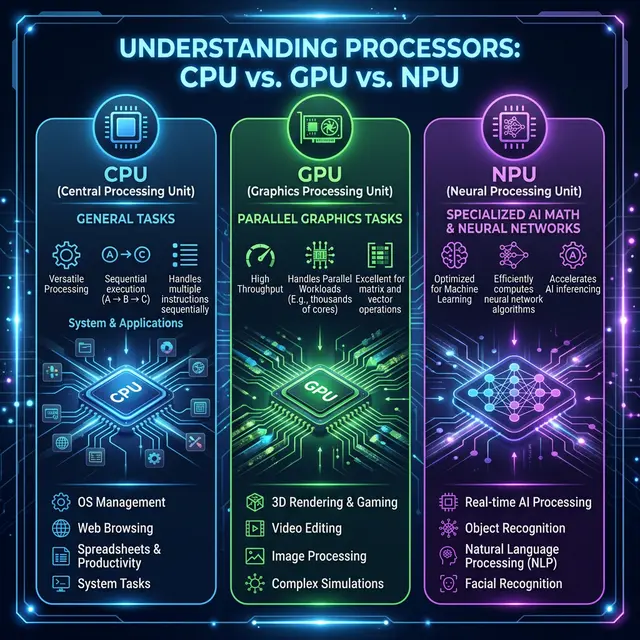
NPU stands for Neural Processing Unit. Think of it as a specialized chip designed from the ground up to handle artificial intelligence tasks. Your CPU is the brain of your computer — it handles everything from running the operating system to loading your browser tabs. Your GPU takes care of graphics — games, video playback, creative work. An NPU? It’s built specifically for AI workloads like voice recognition, image processing, real-time translation, and running machine learning models.
The key difference is how it processes information. A CPU handles tasks one step at a time (more or less). A GPU can chew through a ton of parallel tasks, which is why it’s great for graphics. But an NPU takes that parallel processing idea and optimizes it even further, specifically for the kind of math that AI models need — things like matrix multiplications and neural network calculations. It does all this while sipping power rather than guzzling it.
Here’s a nice way to think about it: imagine you’re at a restaurant. The CPU is the manager who can do a bit of everything. The GPU is the line cook who can handle multiple dishes at once. The NPU is the sushi chef — incredibly specialized, incredibly fast at what it does, and way more efficient than asking the manager to roll your California roll.
Why Are NPUs Suddenly Everywhere?
Two words: on-device AI.
For the past few years, most AI processing happened in the cloud. You’d type a prompt, it would fly off to some data center, get crunched by massive server farms, and the result would come back to your screen. That works fine, but it has real downsides — latency, privacy concerns, and the fact that you need an internet connection for everything.
NPUs flip that script. They let your laptop run AI tasks locally, right on the device. No cloud required. That means faster responses, better battery life, and your data stays on your machine instead of taking a trip to someone else’s server.
And it’s not just a niche thing anymore. According to Gartner, AI PCs — defined as computers with an embedded NPU — are projected to represent about 55% of the total PC market by 2026. That’s up from around 31% at the end of 2025. By 2029, Gartner says AI PCs will essentially become the norm. We’re not talking about a fancy upgrade option here — this is quickly becoming the baseline.
The Big Players: Who’s Making What?
The NPU landscape in 2026 is a four-way race, and it’s getting competitive fast.
Intel Core Ultra processors (the latest being the Panther Lake / Series 3 chips) pack an upgraded NPU delivering around 50 TOPS (Tera Operations Per Second — basically, how many trillions of calculations the chip can crunch per second). Intel has the advantage of deep software compatibility, especially with the Windows ecosystem and enterprise applications.
AMD Ryzen AI chips, powered by their XDNA-based NPU architecture, push up to 50 TOPS as well. AMD has been especially strong in the laptop space, offering solid multi-threaded CPU performance alongside AI acceleration, and their processors tend to deliver great battery life during AI workloads.
Qualcomm’s Snapdragon X2 Elite is the wild card. Built on ARM architecture, Qualcomm’s latest chips push NPU performance up to 80-85 TOPS — nearly double what we saw from the first-generation Snapdragon X Elite. The trade-off? Some legacy Windows apps still need emulation on ARM, which can cause compatibility hiccups. But if you prioritize battery life and always-on connectivity, Qualcomm is hard to beat.
Apple Silicon (M4 and the rumored M5) integrates the Neural Engine directly into the system-on-chip. Apple doesn’t chase raw TOPS numbers the way the Windows side does, but their tight integration between hardware and macOS means the NPU works seamlessly with Apple Intelligence features. For anyone already in the Apple ecosystem, it just works — quietly and efficiently.
What Can an NPU Actually Do For You?
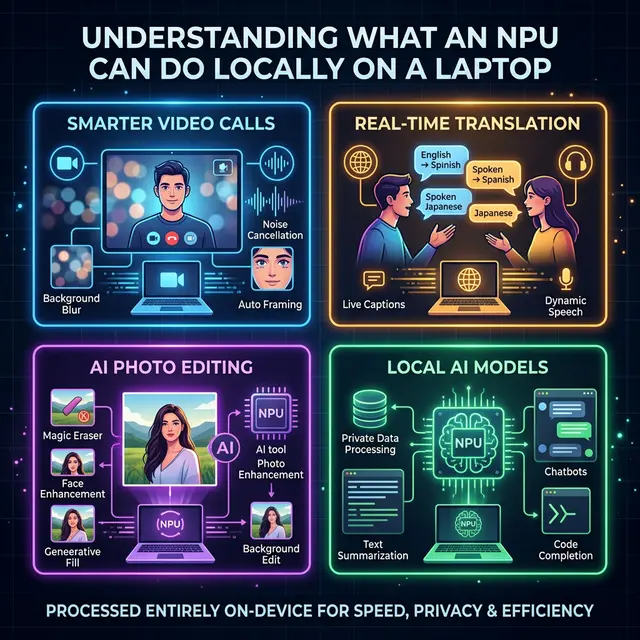
Okay, specs are fun and all, but let’s talk about what this means in practice. Here are some real things NPUs are powering right now:
Smarter Video Calls: Background blur, eye contact correction, automatic framing, and noise suppression during video calls. These features used to tax your CPU or GPU heavily, draining battery and making fans spin. With an NPU handling the load, they run smoothly in the background. According to HP’s testing, NPU-driven processing for these tasks uses only about 5-10 watts compared to 30-40 watts when handled by a GPU. That translates to roughly 15-20% better battery life during long video calls.
Real-Time Transcription and Translation: Live captions during meetings, automatic meeting notes, and on-the-fly language translation — all processed locally without sending your audio to a cloud server. This is a game-changer for remote workers and anyone who sits through a lot of meetings.
Photo and Video Editing: Adobe Lightroom already uses NPU acceleration for AI-powered noise reduction in RAW files. Photoshop’s Generative Fill and intelligent selection tools benefit from it too. DaVinci Resolve leverages the NPU for face recognition and smart masking. Even CapCut and other consumer-grade editors are jumping on board.
Running Local AI Models: This is the exciting frontier. With tools like Microsoft’s Foundry Local and Ollama, you can run small language models directly on your laptop’s NPU — no cloud subscription needed. We’re talking about models like Phi-3.5 running entirely on-device, capable of answering questions, summarizing documents, or generating code while keeping everything private and offline.
Security: On-device AI can analyze behavior patterns in real time, flagging potential threats before they escalate. Microsoft’s 2025 Digital Defense Report highlighted that AI-assisted threat detection can cut breach response time significantly, and NPUs make this kind of continuous monitoring possible without killing your battery.
Do You Actually Need an NPU Right Now?
Here’s the honest take: if you’re buying a new laptop in 2026, you’re almost certainly going to get one whether you specifically want it or not. NPUs are becoming standard equipment, not a premium add-on.
But do you need to specifically seek one out? That depends on your workflow. If you spend your days on video calls, edit photos or videos, work with AI-powered productivity tools, or care about data privacy, an NPU will make a noticeable difference in your daily experience.
If you mostly browse the web, write documents, and watch YouTube? You’ll still benefit from things like better battery life and smoother system performance, but it won’t be a dramatic “wow, everything changed” moment. The improvements will be more subtle — like how you don’t really notice good air conditioning until it’s gone.
One important thing to understand: NPUs only speed up on-device AI processing. If you’re using ChatGPT through a browser or Google’s cloud-based AI tools, the NPU isn’t doing anything for those — that processing happens on remote servers. The NPU shines when applications are built to take advantage of local AI capabilities.
The Road Ahead
The NPU story is still in its early chapters. Software support is catching up to the hardware — Microsoft’s Copilot+ initiative, Apple Intelligence, and growing developer frameworks from Intel, AMD, and Qualcomm are all pushing more applications to take advantage of local AI processing. Gartner projects that by the end of 2026, around 40% of software vendors will prioritize AI features that run directly on PCs, up from just 2% in 2024. That’s a massive shift in a very short time.
Looking further out, chip makers are already teasing next-generation silicon that could push NPU performance past 100 TOPS. The long-term vision from the industry is what some are calling “full-day agentic computing” — an AI assistant running in the background for 15+ hours on a single charge, managing your entire digital workflow without ever pinging a remote server.
That future isn’t here yet. But the hardware foundation is being laid right now, and the NPU is at the heart of it. Whether you’re a creative professional, a developer experimenting with local AI models, or just someone who wants their laptop to be smarter and last longer on a charge — the NPU is the chip that’s going to make it happen.
The CPU got us through the last few decades. The GPU transformed gaming and creative work. The NPU? It’s the chip that’s going to define the AI era of personal computing. And it’s already in your next laptop.
Share :
Stay Ahead in Tech
Join thousands of developers and tech enthusiasts. Get our top stories delivered safely to your inbox every week.
No spam. Unsubscribe at any time.