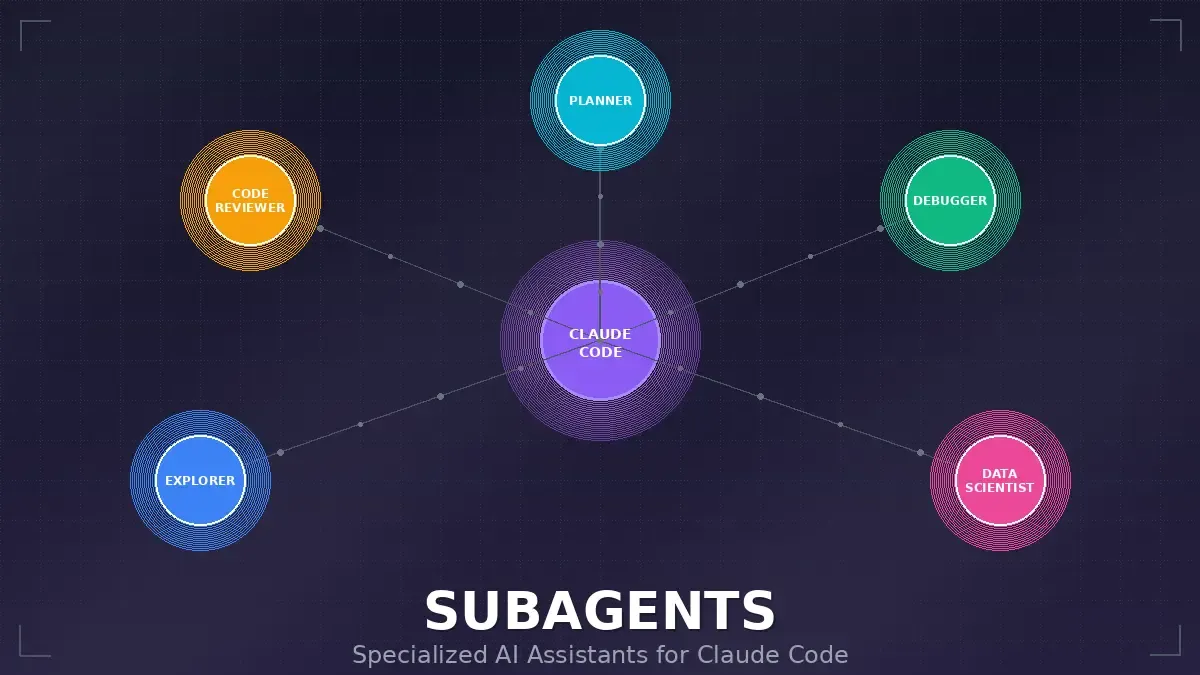
Claude Code Subagents: Your Personal Army of Specialized AI Assistants
- Turker Senturk
- AI
- 23 Jan, 2026
- 15 min read
You know that feeling when you’re deep in a coding session, and your brain is juggling seventeen different things at once? You’re trying to fix a bug, but you also need to review some code, run tests, and maybe figure out why that one API endpoint is acting weird. It’s like being a one-person orchestra where everyone’s playing a different song.
Well, Claude Code just handed us a solution that feels almost too obvious in hindsight: subagents. Think of them as specialized mini-Claudes that you can spin up for specific tasks, each with its own expertise and memory space. It’s like having a team of expert consultants you can call in whenever you need them, without them stepping on each other’s toes.
What Exactly Are Subagents?
At their core, subagents are pre-configured AI personalities that live within Claude Code. Each one is designed to handle a specific type of task, and here’s the clever part — they operate in their own context window, completely separate from your main conversation.
Why does this matter? Well, imagine you’re working on a complex feature and you need to do a deep dive into your codebase to understand some legacy authentication system. Without subagents, all that exploration pollutes your main conversation with hundreds of lines of search results and file contents. Your context window fills up with noise, and suddenly Claude is forgetting what you were actually trying to accomplish.
With subagents, that exploration happens in a separate sandbox. The subagent does its thing, finds what it needs, and returns a clean summary. Your main conversation stays focused on the high-level objectives. It’s like having a research assistant who goes to the library for you instead of dumping all their notes on your desk.
Each subagent comes with:
- A specific purpose and expertise area — like a code reviewer, debugger, or data scientist
- Its own isolated context window — no more conversation pollution
- Configurable tool access — you decide what capabilities each subagent gets
- A custom system prompt — guiding how it approaches problems
The Four Pillars of Subagent Benefits
Context Preservation
This is the big one. Every time Claude needs to search through files, read documentation, or explore a codebase, that content eats into your context window. Subagents operate in their own space, keeping your main conversation clean and focused on what matters.
Specialized Expertise
You can fine-tune subagents with incredibly detailed instructions for specific domains. A generic AI assistant might give you decent code reviews, but a subagent that’s been specifically configured with your team’s coding standards, security requirements, and architectural patterns? That’s going to catch things a generalist would miss.
Reusability
Once you create a killer subagent, you can use it across all your projects. Even better, you can share it with your team. Imagine everyone on your team having access to the same perfectly-tuned code reviewer that enforces your company’s standards consistently.
Flexible Permissions
Not every task needs access to every tool. Your code exploration subagent probably doesn’t need write permissions. Your test runner definitely needs Bash access. Subagents let you apply the principle of least privilege to your AI assistants.
Getting Started: Your First Subagent in Four Steps
Creating a subagent is surprisingly straightforward. Here’s the quick path:
Step 1: Open the subagents interface:
/agentsStep 2: Select ‘Create New Agent’ and choose whether it should be project-level (just for this project) or user-level (available everywhere).
Step 3: Define your subagent. Here’s a pro tip from the documentation: generate it with Claude first, then customize. Describe what you want in detail, select the tools you want to grant access to, and let Claude draft the initial prompt. Then tweak it to match your specific needs.
Step 4: Save and use! Claude will automatically delegate appropriate tasks to your subagent, or you can invoke it explicitly:
> Use the code-reviewer subagent to check my recent changesThe Anatomy of a Subagent Configuration
Subagents live as Markdown files with YAML frontmatter. They can be stored in two places:
| Type | Location | Scope |
|---|---|---|
| Project subagents | .claude/agents/ | Only this project |
| User subagents | ~/.claude/agents/ | All your projects |
When names conflict, project-level subagents win — which makes sense. You might want a project-specific code reviewer that knows about that weird legacy pattern your team uses.
Here’s what a subagent file looks like:
---
name: your-sub-agent-name
description: Description of when this subagent should be invoked
tools: tool1, tool2, tool3  # Optional - inherits all tools if omitted
model: sonnet  # Optional - specify model alias or 'inherit'
permissionMode: default  # Optional - permission mode for the subagent
skills: skill1, skill2  # Optional - skills to auto-load
---

Your subagent's system prompt goes here. This can be multiple paragraphs
and should clearly define the subagent's role, capabilities, and approach
to solving problems.

Include specific instructions, best practices, and any constraints
the subagent should follow.
Configuration Fields Breakdown
| Field | Required | What It Does |
|---|---|---|
name | Yes | Unique identifier (lowercase letters and hyphens only) |
description | Yes | Natural language description — this is what Claude uses to decide when to invoke the subagent |
tools | No | Comma-separated list of specific tools; omit to inherit all tools |
model | No | Model to use (sonnet, opus, haiku, or inherit) |
permissionMode | No | How the subagent handles permission requests |
skills | No | Skills to auto-load when the subagent starts |
The inherit option for models is particularly clever. If you want your subagent to always use whatever model your main conversation is using, just set model: inherit. This keeps things consistent without you having to think about it.
Available Tools
Subagents can use any of Claude Code’s internal tools. The /agents command provides an interactive interface that shows all available tools — including any MCP server tools you’ve connected — making it easy to pick what you need.
You have two approaches:
- Omit the
toolsfield entirely to inherit all tools from the main thread (including MCP tools) - Specify individual tools for more granular control
CLI-Based Configuration for the Power Users
Sometimes you don’t want to create a file. Maybe you’re testing a new subagent configuration, or you need a one-off subagent for a specific session, or you’re writing an automation script.
The --agents CLI flag accepts a JSON object:
claude --agents '{
  "code-reviewer": {
    "description": "Expert code reviewer. Use proactively after code changes.",
    "prompt": "You are a senior code reviewer. Focus on code quality, security, and best practices.",
    "tools": ["Read", "Grep", "Glob", "Bash"],
    "model": "sonnet"
  }
}'
This is also fantastic for sharing subagent configurations in documentation or scripts. “Here, run Claude Code with this flag and you’ll have the same subagent I used.”
The Built-In Subagents: Meet the Team
Claude Code comes with three pre-configured subagents that handle common use cases out of the box.
The General-Purpose Subagent
This is your Swiss Army knife. It’s a capable agent for complex, multi-step tasks that require both exploration AND action. Unlike the Explore subagent, it can actually modify files and execute a wider range of operations.
Key stats:
- Uses Sonnet for more capable reasoning
- Has access to all tools
- Can read AND write files, execute commands, make changes
Claude delegates to this subagent when tasks need both exploration and modification, when complex reasoning is needed to interpret search results, or when multiple strategies might be needed.
Example scenario:
User: Find all the places where we handle authentication and update them to use the new token format

Claude: [Invokes general-purpose subagent]
[Agent searches for auth-related code across codebase]
[Agent reads and analyzes multiple files]
[Agent makes necessary edits]
[Returns detailed writeup of changes made]
The Plan Subagent
This one’s specialized for plan mode. When Claude is in non-execution mode and needs to research your codebase before presenting a plan, it uses this subagent.
Key stats:
- Uses Sonnet for capable analysis
- Has access to Read, Glob, Grep, and Bash tools for exploration
- Searches files, analyzes code structure, gathers context
- Invoked automatically when you’re in plan mode
There’s a clever architectural reason for this: subagents can’t spawn other subagents (that would get messy fast). So the Plan subagent handles the research while keeping the nesting under control.
Example:
User: [In plan mode] Help me refactor the authentication module

Claude: Let me research your authentication implementation first...
[Internally invokes Plan subagent to explore auth-related files]
[Plan subagent searches codebase and returns findings]
Claude: Based on my research, here's my proposed plan...
The Explore Subagent
This is your speed demon. It’s a fast, lightweight agent optimized purely for searching and analyzing codebases. The key constraint? It operates in strict read-only mode.
Key stats:
- Uses Haiku for fast, low-latency searches
- Strictly read-only — cannot create, modify, or delete files
- Tools available: Glob, Grep, Read, and read-only Bash commands
When you need to understand something in a codebase but don’t need to change anything, this subagent is perfect. It’s more efficient than having the main agent run multiple search commands directly, and crucially, everything it finds stays in its own context — not cluttering your main conversation.
The Explore subagent also has configurable thoroughness levels:
- Quick — Basic searches, fastest results. Good for simple lookups.
- Medium — Moderate exploration. Balances speed and thoroughness.
- Very thorough — Comprehensive analysis across multiple locations and naming conventions.
Example:
User: Where are errors from the client handled?

Claude: [Invokes Explore subagent with "medium" thoroughness]
[Explore uses Grep to search for error handling patterns]
[Explore uses Read to examine promising files]
[Returns findings with absolute file paths]
Claude: Client errors are handled in src/services/process.ts:712...
Real-World Subagent Examples
Let’s look at some production-ready subagent configurations you can steal and customize.
The Code Reviewer
---
name: code-reviewer
description: Expert code review specialist. Proactively reviews code for quality, security, and maintainability. Use immediately after writing or modifying code.
tools: Read, Grep, Glob, Bash
model: inherit
---

You are a senior code reviewer ensuring high standards of code quality and security.

When invoked:
1. Run git diff to see recent changes
2. Focus on modified files
3. Begin review immediately

Review checklist:
- Code is simple and readable
- Functions and variables are well-named
- No duplicated code
- Proper error handling
- No exposed secrets or API keys
- Input validation implemented
- Good test coverage
- Performance considerations addressed

Provide feedback organized by priority:
- Critical issues (must fix)
- Warnings (should fix)
- Suggestions (consider improving)

Include specific examples of how to fix issues.
The Debugger
---
name: debugger
description: Debugging specialist for errors, test failures, and unexpected behavior. Use proactively when encountering any issues.
tools: Read, Edit, Bash, Grep, Glob
---

You are an expert debugger specializing in root cause analysis.

When invoked:
1. Capture error message and stack trace
2. Identify reproduction steps
3. Isolate the failure location
4. Implement minimal fix
5. Verify solution works

Debugging process:
- Analyze error messages and logs
- Check recent code changes
- Form and test hypotheses
- Add strategic debug logging
- Inspect variable states

For each issue, provide:
- Root cause explanation
- Evidence supporting the diagnosis
- Specific code fix
- Testing approach
- Prevention recommendations

Focus on fixing the underlying issue, not just symptoms.
The Data Scientist
---
name: data-scientist
description: Data analysis expert for SQL queries, BigQuery operations, and data insights. Use proactively for data analysis tasks and queries.
tools: Bash, Read, Write
model: sonnet
---

You are a data scientist specializing in SQL and BigQuery analysis.

When invoked:
1. Understand the data analysis requirement
2. Write efficient SQL queries
3. Use BigQuery command line tools (bq) when appropriate
4. Analyze and summarize results
5. Present findings clearly

Key practices:
- Write optimized SQL queries with proper filters
- Use appropriate aggregations and joins
- Include comments explaining complex logic
- Format results for readability
- Provide data-driven recommendations

For each analysis:
- Explain the query approach
- Document any assumptions
- Highlight key findings
- Suggest next steps based on data

Always ensure queries are efficient and cost-effective.
Using Subagents Effectively
Automatic Delegation
Claude Code is smart enough to proactively delegate tasks based on:
- What you’re asking for
- The
descriptionfield in subagent configurations - Current context and available tools
Pro tip: Want Claude to use a particular subagent more aggressively? Include phrases like “use PROACTIVELY” or “MUST BE USED” in your description field.
Explicit Invocation
Sometimes you want to be specific about which subagent to use:
> Use the test-runner subagent to fix failing tests
> Have the code-reviewer subagent look at my recent changes
> Ask the debugger subagent to investigate this error
Advanced Techniques
Chaining Subagents
For complex workflows, you can string multiple subagents together:
> First use the code-analyzer subagent to find performance issues, then use the optimizer subagent to fix themResumable Subagents
Here’s where things get really interesting. Subagents can be resumed to continue previous conversations. This is gold for long-running research or analysis tasks.
How it works:
- Each subagent execution gets a unique
agentId - The conversation is stored in a separate transcript file:
agent-{agentId}.jsonl - You can resume a previous agent by providing its
agentId - When resumed, the agent continues with full context from its previous conversation
Example workflow:
# Initial invocation
> Use the code-analyzer agent to start reviewing the authentication module

[Agent completes initial analysis and returns agentId: "abc123"]

# Later, resume the agent
> Resume agent abc123 and now analyze the authorization logic as well

[Agent continues with full context from previous conversation]
This is perfect for:
- Long-running research — Break down large codebase analysis into multiple sessions
- Iterative refinement — Continue refining a subagent’s work without losing context
- Multi-step workflows — Have a subagent work on related tasks sequentially while maintaining context
For programmatic usage:
{
  "description": "Continue analysis",
  "prompt": "Now examine the error handling patterns",
  "subagent_type": "code-analyzer",
  "resume": "abc123"
}
Best Practices
After reading through the documentation and thinking about how this fits into real workflows, here are the key takeaways:
-
Start with Claude-generated agents — Generate your initial subagent with Claude, then iterate. You get a solid foundation that you can customize to your specific needs.
-
Design focused subagents — Single, clear responsibilities beat jack-of-all-trades. Your debugger shouldn’t also be your code reviewer.
-
Write detailed prompts — The more guidance you provide, the better results you get. Include specific instructions, examples, and constraints.
-
Limit tool access — Apply the principle of least privilege. Your exploration subagent probably doesn’t need write permissions.
-
Version control your subagents — Check project subagents into git so your team can benefit from and improve them collaboratively.
Performance Considerations
There are trade-offs to keep in mind:
The good: Subagents help preserve your main context, enabling longer overall sessions. All that exploration and analysis happens in a separate space, leaving your main conversation free for high-level coordination.
The not-so-good: Subagents start with a clean slate each time. They need to gather context at the start of each invocation, which can add latency. It’s a trade-off between context preservation and startup time.
The Bottom Line
Subagents represent a fundamental shift in how we can work with AI coding assistants. Instead of one monolithic assistant that tries to do everything (and eventually runs out of context), we get a team of specialists that we can coordinate.
The analogy that keeps coming back to me is running a small development shop. You’re the project manager, Claude Code is your coordinator, and subagents are the specialists you bring in for specific tasks. The code reviewer does reviews. The debugger debugs. The data scientist analyzes data. And nobody gets in each other’s way.
Is it perfect? No system is. There’s overhead in setting up subagents, and there’s latency when they need to gather context. But for complex projects where you’re constantly switching between different types of tasks, this architecture makes a lot of sense.
If you’re not already using Claude Code’s subagent system, it’s worth carving out an hour to set up a few basics: a code reviewer, a debugger, maybe a test runner. Future you will thank present you when you’re deep in a complex debugging session and your context isn’t full of three hours’ worth of file exploration.
Sources
Share :
Stay Ahead in Tech
Join thousands of developers and tech enthusiasts. Get our top stories delivered safely to your inbox every week.
No spam. Unsubscribe at any time.